
iOS 13: Here’s how iPhone users can get the Memoji Stickers for WhatsApp, iMessage
iOS 13's Memoji feature can be used on not just iMessage but WhatsApp as well, it is only accessible to users who own the iPhone X and newer models of the phone.
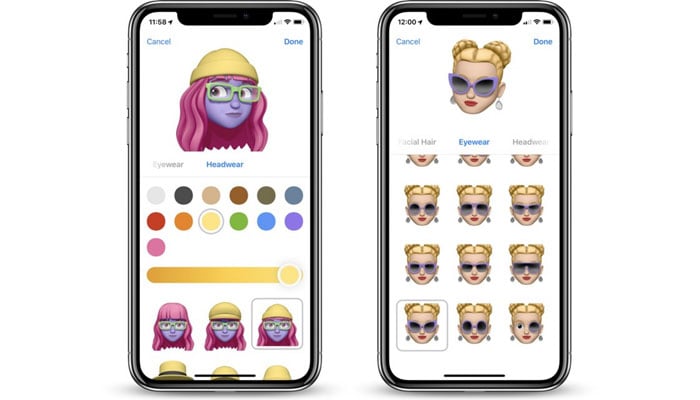
Right after Apple launched the iOS 13, iPhone users could not hold their excitement for the bundle of new features that were in store for them. However, there was one feature that was widely anticipated by all –the Memoji Stickers.
The characters brought to life on Apple devices have thus far been regarded as one of the favourites by all tech geeks as they get a chance to create their own avatars displaying all kinds of emotions.
As per Apple’s websites, the avatars “will allow users to express a variety of emotions in Messages."
While the feature can be used on not just iMessage but WhatsApp as well, it is only accessible to users who own the iPhone X and newer models of the phone.
In order to use the Memoji Stickers, here is what you need to do:
Open Messages app
Open a chat
If you open an existing chat, there will be an icon with multiple faces next to the Apple Store icon.
Go to the three dots appearing at the top left corner.
Tap on New Memoji option.
Select your features and voila.





-
 Sun appears spotless for first time in four years, scientists report
 -
 SpaceX launches another batch of satellites from Cape Canaveral during late-night mission on Saturday
 -
 NASA targets March 6 for launch of crewed mission around moon following successful rocket fueling test
 -
 Greenland ice sheet acts like ‘churning molten rock,’ scientists find
 -
 Space-based solar power could push the world beyond net zero: Here’s how
 -
 Hidden ‘dark galaxy' traced by ancient star clusters could rewrite the cosmic galaxy count
 -
 Astronauts face life threatening risk on Boeing Starliner, NASA says
 -
 Giant tortoise reintroduced to island after almost 200 years