
Instagram lets users turn Read Receipts off THIS way
Meta app is also allowing users to turn off Read Receipts just like WhatsApp, iMessage in simple way

Instagram also notifies the message sender whether you have seen their text and vice versa, much like the read receipts on iMessage, WhatsApp, and other chat apps.
As a result, a "Seen" or "Read" tag notifies the sender that you have seen their message after you have seen it, according to IDB.
Upon reading a direct message (DM), you can feel under pressure to respond, and the recipient of the message might anticipate hearing from you shortly.
Therefore, if you want to avoid these circumstances and don't want to make it clear that you have seen a message, turning off read receipts is the best option.
Turn Read Receipts off on Instagram
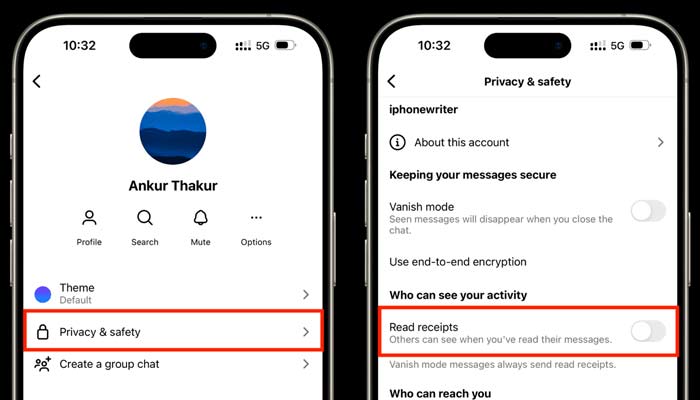
On your phone, open Instagram on your iPhone and then go to the chats. Click on the conversation whose read receipt you want to turn off. Once you are in the chats, click their name from the top. Then go to privacy and safety, and click "Turn off Read Receipts".
Instagram has launched many features for its users. Broadcast channels, chat themes and collaborative posts are few among them.






-
 Sun appears spotless for first time in four years, scientists report
 -
 SpaceX launches another batch of satellites from Cape Canaveral during late-night mission on Saturday
 -
 NASA targets March 6 for launch of crewed mission around moon following successful rocket fueling test
 -
 Greenland ice sheet acts like ‘churning molten rock,’ scientists find
 -
 Space-based solar power could push the world beyond net zero: Here’s how
 -
 Hidden ‘dark galaxy' traced by ancient star clusters could rewrite the cosmic galaxy count
 -
 Astronauts face life threatening risk on Boeing Starliner, NASA says
 -
 Giant tortoise reintroduced to island after almost 200 years